Rust Development Environment Guide
XWOS RUST Build Tool Installation Guide
2 minute read
Installing Rust
Install RUST according to the official guide
Ubuntu
- Download
rustup.shcurl --proto '=https' --tlsv1.2 -sSf https://sh.rustup.rs > rustup.sh
- Set the environment variables
RUSTUP_UPDATE_ROOTandRUSTUP_DIST_SERVER. There are two ways:-
- A one-time setup: append the following lines to
~/.profile
export RUSTUP_DIST_SERVER="https://rsproxy.cn"export RUSTUP_UPDATE_ROOT="https://rsproxy.cn/rustup"
- A one-time setup: append the following lines to
-
- Use temporary environment variables: open
bash
- Use temporary environment variables: open
-
export RUSTUP_DIST_SERVER="https://rsproxy.cn"
export RUSTUP_UPDATE_ROOT="https://rsproxy.cn/rustup"
- Run
rustup.sh
sh rustup.sh
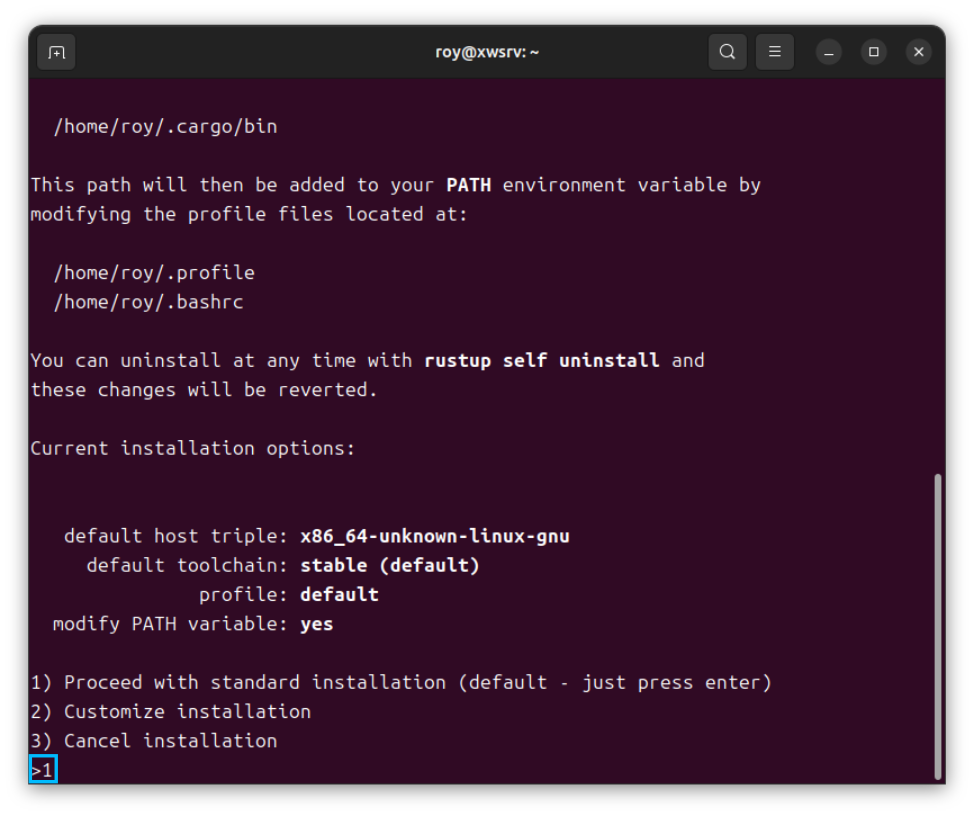
Just install with the default configuration:
Windows
- Download
rustup-init.exe - Set the environment variables
RUSTUP_UPDATE_ROOTandRUSTUP_DIST_SERVER. There are two ways:-
- A one-time setup: right-click
This PC–>Properties–>Advanced system settings–>Environment Variables, and add the following two environment variables
RUSTUP_UPDATE_ROOT:https://rsproxy.cn/rustupRUSTUP_DIST_SERVER:https://rsproxy.cn
- A one-time setup: right-click
-
- Use temporary environment variables: open
powershell
- Use temporary environment variables: open
-
$ENV:RUSTUP_DIST_SERVER='https://rsproxy.cn'
$ENV:RUSTUP_UPDATE_ROOT='https://rsproxy.cn/rustup'
- Run
rustup-init.exe
.\rustup-init.exe
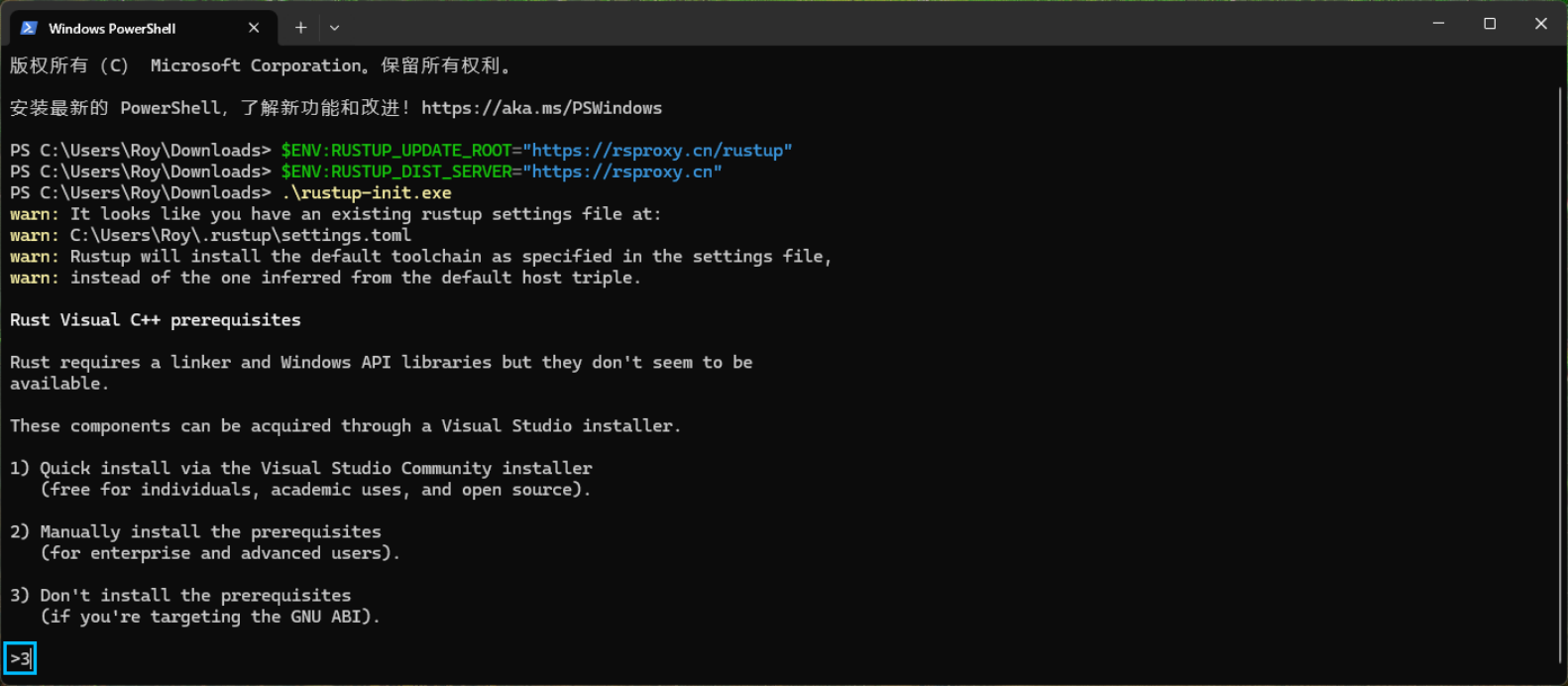
- No need to install msvc; select
3in the first step:
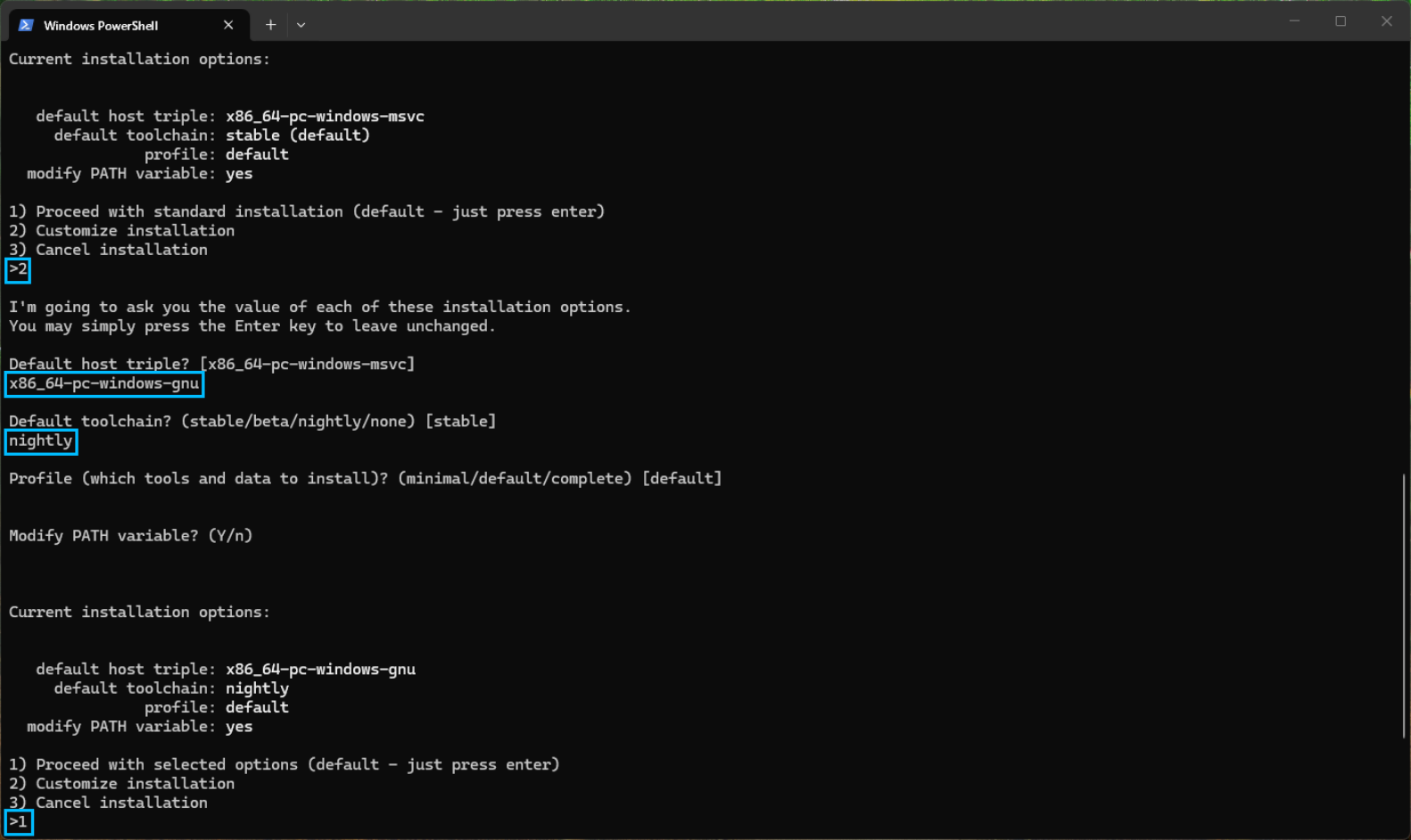
- Set the target to
x86_64-pc-windows-gnunightly
Installing the standard library with cargo
Switching cargo mirror sources
- Configuration file
- Ubuntu configuration file path:
~/.cargo/config.toml - Windows configuration file path:
C:\Users\username\.cargo\config.toml
- Ubuntu configuration file path:
[source.crates-io]
replace-with = 'ustc'

[source.ustc]
registry = "sparse+https://mirrors.ustc.edu.cn/crates.io-index/"

[registries.ustc]
index = "sparse+https://mirrors.ustc.edu.cn/crates.io-index/"

[source.tuna]
registry = "sparse+https://mirrors.tuna.tsinghua.edu.cn/crates.io-index/"

[registries.tuna]
index = "sparse+https://mirrors.tuna.tsinghua.edu.cn/crates.io-index/"

[source.sjtu]
registry = "sparse+https://mirrors.sjtug.sjtu.edu.cn/crates.io-index/"

[registries.sjtu]
index = "sparse+https://mirrors.sjtug.sjtu.edu.cn/crates.io-index/"

[source.rsproxy]
registry = "sparse+https://rsproxy.cn/index/"

[registries.rsproxy]
index = "https://rsproxy.cn/crates.io-index/"

[net]
git-fetch-with-cli = true
- Ubuntu: install the unstable version
rustup install nightly
rustup +nightly target add thumbv8m.main-none-eabihf
rustup +nightly target add thumbv8m.main-none-eabi
rustup +nightly target add thumbv8m.base-none-eabi
rustup +nightly target add thumbv7m-none-eabi
rustup +nightly target add thumbv7em-none-eabihf
rustup +nightly target add thumbv7em-none-eabi
rustup +nightly target add thumbv6m-none-eabi
rustup +nightly target add riscv32imac-unknown-none-elf
rustup +nightly target add aarch64-unknown-none
rustup +nightly component add rust-src
- Windows: install the unstable version
Note: Windows only supports using the gnu version of the toolchain
rustup install nightly-x86_64-pc-windows-gnu
rustup +nightly-x86_64-pc-windows-gnu target add thumbv8m.main-none-eabihf
rustup +nightly-x86_64-pc-windows-gnu target add thumbv8m.main-none-eabi
rustup +nightly-x86_64-pc-windows-gnu target add thumbv8m.base-none-eabi
rustup +nightly-x86_64-pc-windows-gnu target add thumbv7m-none-eabi
rustup +nightly-x86_64-pc-windows-gnu target add thumbv7em-none-eabihf
rustup +nightly-x86_64-pc-windows-gnu target add thumbv7em-none-eabi
rustup +nightly-x86_64-pc-windows-gnu target add thumbv6m-none-eabi
rustup +nightly-x86_64-pc-windows-gnu target add riscv32imac-unknown-none-elf
rustup +nightly-x86_64-pc-windows-gnu target add aarch64-unknown-none
rustup +nightly-x86_64-pc-windows-gnu component add rust-src